I captured price data from bringing up a chart for both the binance symbol and the Crypto compare.
I cleared local cache, restarted and the missing data from 6/28/2023 until 2/19/25 becomes apparent.
I was using
DOGEUSD
DOGE.USD
as my two symbols.
Testing further ETHUSD has the same problem, starting at a different date but about 900 rows in
Thoughts and suggestions to diagnose?
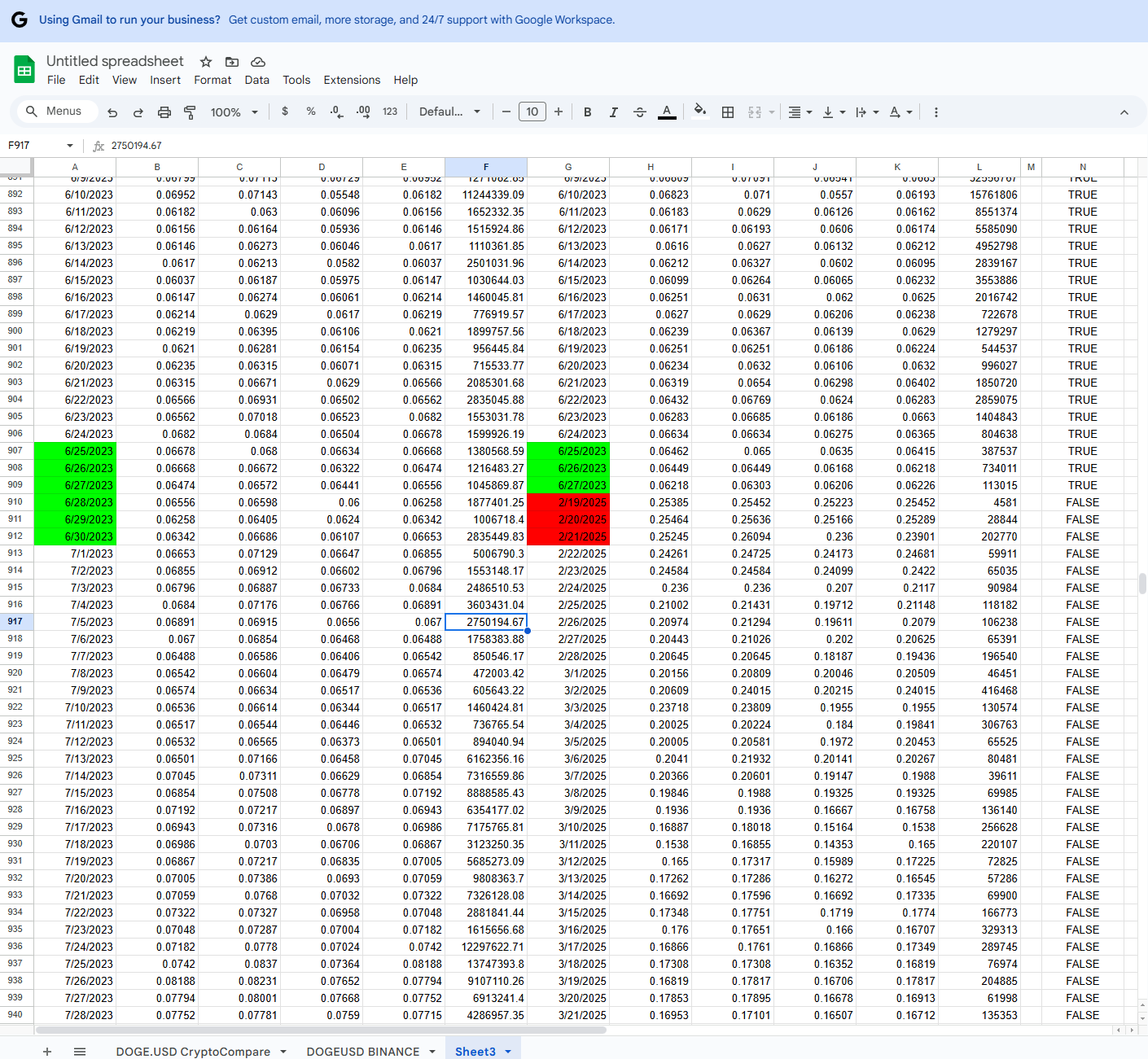
I cleared local cache, restarted and the missing data from 6/28/2023 until 2/19/25 becomes apparent.
I was using
DOGEUSD
DOGE.USD
as my two symbols.
Testing further ETHUSD has the same problem, starting at a different date but about 900 rows in
Thoughts and suggestions to diagnose?
Rename
I'm not certain this is the case here, but it could be that backfill is limited to 1 year of data. You could be sure just by Reloading the chart (right click option). Make a backup of your current data file(s) first. You may lose the data more than 1 year old.
Data integrity from 2021 through 6/27/23 looks good. Then looks good after 2/19/25.
I just have a hole.
If there is not a better way, Would it be possible to add
doge
eth
xrp
to the wealthlab dataset like btc is?
the files dont appear to be editable or I would do a merge to get historical in sync, or a copy over if I had replacement files/
I just have a hole.
If there is not a better way, Would it be possible to add
doge
eth
xrp
to the wealthlab dataset like btc is?
the files dont appear to be editable or I would do a merge to get historical in sync, or a copy over if I had replacement files/
In the Data Mgr, select the DataSet, then the symbol(s). Then use Data Truncation at the bottom to truncate the data after 6/27/2023. Then try to update it again.
If you get the same result, it's probably because they only provide 1 year of data.
If you get the same result, it's probably because they only provide 1 year of data.
Got it, that suggests backtesting on something else like CryptoCompare and then use Binance as the streaming for live trading.
Does that make sense?
Does that make sense?
If the problem is CryptoCompare, create a CryptoCompare Dataset. Truncate that one, then just update it.
nope problem is binance.
Cryprocompare data is how I found the problem with the binance dataset.
Cryprocompare data is how I found the problem with the binance dataset.
That was an "If". So it's the same answer, just substitute Binance.
Your Response
Post
Edit Post
Login is required