WEALTHLAB 9 | 25+ Years of Backtesting Innovation

Build Better Trading Strategies. Backtest with Confidence.

Develop, test, and automate trading strategies with professional portfolio backtesting, powerful optimization tools, and AI-assisted strategy development.

Build visually. Write C#. Or work with AI. Your choice.

Free 14-day trial • Windows 10/11 • No coding required

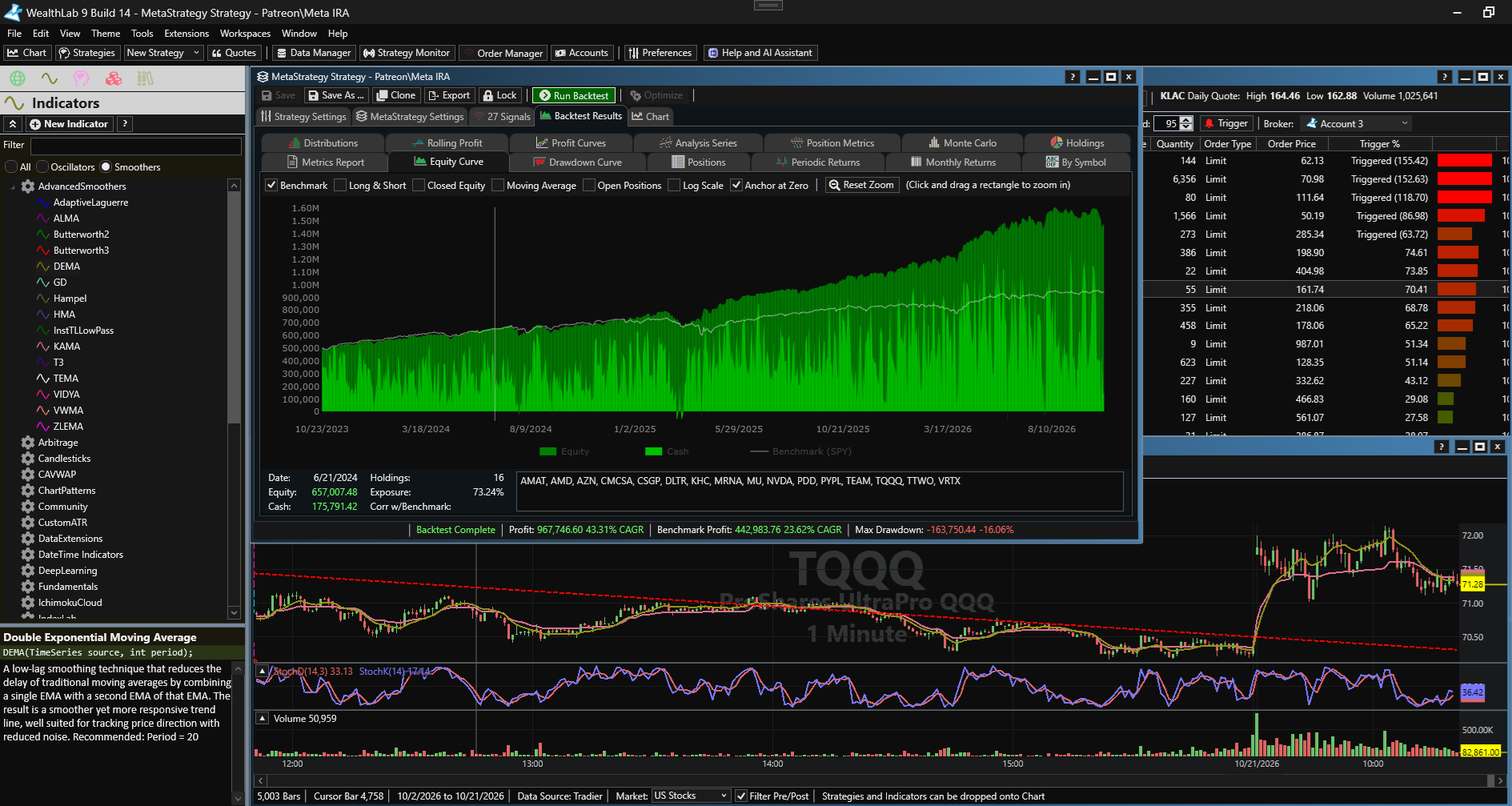
WealthLab 9 desktop application showing strategy development and backtest analysis

Research ideas. Backtest portfolios. Analyze results.

Windows desktop · No credit card required for the trial

Your idea. Your way.

Three ways in.
One powerful engine.

Start where you're comfortable. Go deeper when you're ready. Every approach leads to the same portfolio backtesting and analysis tools.

01 / VISUAL

Build without code.

Combine entries, exits, and conditions with drag-and-drop Building Blocks. Turn a repeatable setup into something you can test.
02 / AI ASSISTED
AN IDEA TO EXPLORE

“Build a mean-reversion strategy, then help me test how it behaves in different market conditions.”

From conversation to code

Think it. Then test it.

Explore ideas with the AI Strategy Generator and connect Claude through MCP to assist with strategy development and backtesting.

03 / C# DEVELOPMENT
Strategy.cs
public override void Execute(
    BarHistory bars, int idx)
{
    // Your logic. Your edge.
    if (rsi[idx] < threshold)
        PlaceTrade(bars,
            TransactionType.Buy,
            OrderType.Market);
}

Make it your own.

Write strategies and indicators in C#. Extend your research with a documented API and an ecosystem of data, broker, and analysis extensions.

Illustrative workflows and code excerpt. These examples are not trading recommendations.

Confidence comes from the details.

A good-looking curve
is only the beginning.

Ask harder questions before you commit capital. Explore the data, assumptions, and portfolio behavior behind your results.

Portfolio Strategy A Strategy B Strategy C

The bigger picture

Test the portfolio.
Not just the trade.

Account for shared capital and position sizing. Combine systems in a MetaStrategy and examine their individual contributions, correlations, and combined behavior.

See how your strategies work together in one portfolio.

  1. Use the universe that existed then.

    Research with historical index constituents through WealthData, including companies that have since left the index.

  2. Test across changing markets.

    Compare strategies with rolling-window backtests and walk-forward optimization. See where an approach holds up—and where it struggles.

  3. Bring the constraints into the test.

    Evaluate commissions, slippage, position sizing, and available capital rather than judging a strategy by its entry signals alone.

  4. Understand what drives each trade.

    Explore Position Metrics and Analysis Series to investigate the conditions associated with your strategy's outcomes.

Windows desktop · No credit card required for the trial

From research to routine

Your strategy.
Ready for the
trading day.

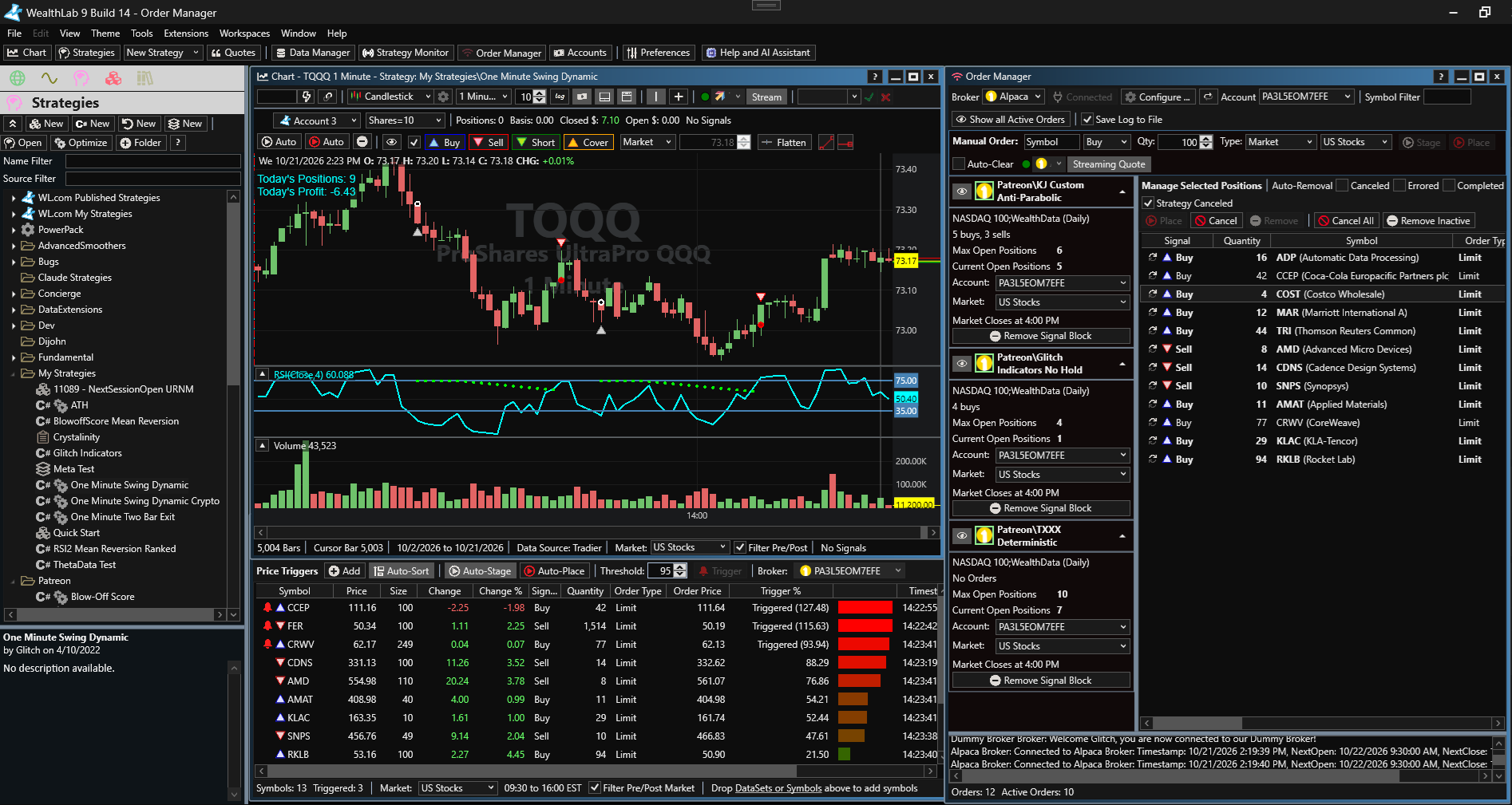
Monitor strategies, review signals, and send orders through supported broker connections. Keep research and execution in the same environment.

Find your broker & data feed

Connections and market coverage vary by extension.

WealthLab 9 trading workspace with a strategy chart, price triggers, and Order Manager signals
WealthLab 9 — strategy charts, price triggers, and Order Manager in one workspace.
EXTEND YOUR WORKSPACE Interactive Brokers IQFeed Norgate Data ThetaData View extensions

Your next strategy starts here.

Bring your curiosity.
We'll bring the tools.

Take your next trading idea from a question to a backtest. Explore strategy building, portfolio research, and analysis with WealthLab 9.

Windows desktop · No credit card required for the trial