Hi all,
I'm just playing with the building blocks to familiarise myself with the setting.
I have built to following simple blocks
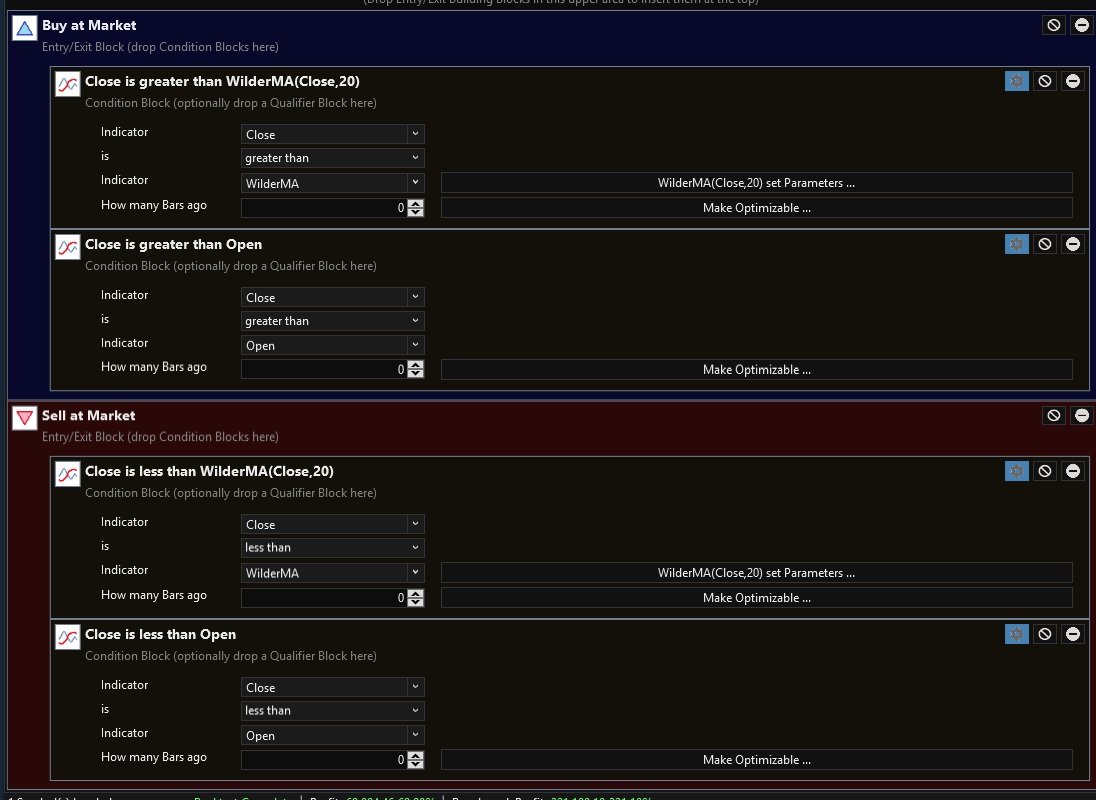
and would have expected a position to be opened here
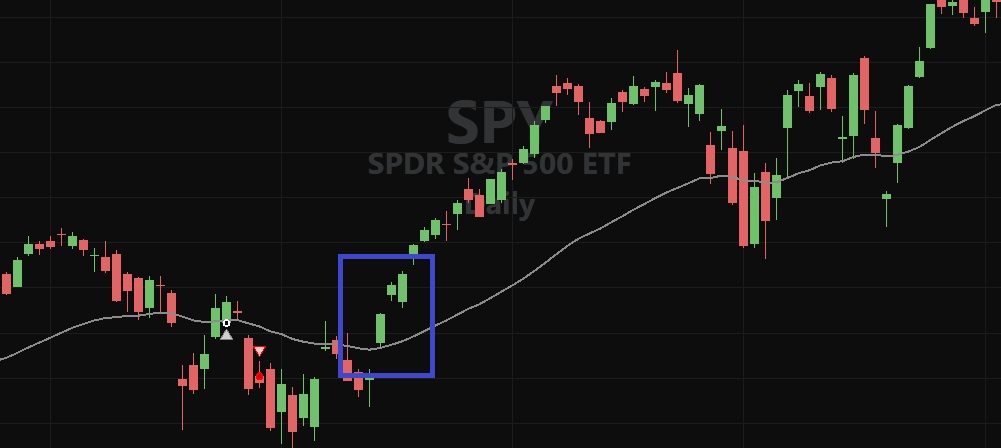
Is there a setting I need to tweak?
I'm just playing with the building blocks to familiarise myself with the setting.
I have built to following simple blocks
and would have expected a position to be opened here
Is there a setting I need to tweak?
Rename
You didn't show your Strategy Settings but probably ran it with 100% of equity without any margin. Due to the gap higher, there wasn't enough buying power based on the calculated shares using the closing price the day before. The result is a "NSF Position", which isn't included in the backtest.
There are several ways to deal with this, but for full context see Help (F1) > Strategy > Strategy Settings > Basis Price
There are several ways to deal with this, but for full context see Help (F1) > Strategy > Strategy Settings > Basis Price
Thank you Cone - I have unchecked "Retain NSF Positions". I'm assuming this means the opposite of what it is saying - i.e. a trade is executed regardless of funds
"Retain NSF Positions" is a different thing altogether and is not a solution for the gap scenario.
Here's how that would work in this 100% of Equity case -
Assumptions:
1. your strategy buys at Market with 100% of equity, 1:1 margin.
2. exit after 5 bars.
3. the 3 green bars above the moving average in the blue box are numbered 1, 2, and 3.
Case 1: Retain NSF - Enabled
Signal bar #1 buys at the open of #2. Due to the gap, the Position is rejected in the backtest and is marked as a NSF Position. (See the NSF Position count in the Metrics Report.) Behind the scenes, the strategy backtest processes this position (retained) and will exit it 5 bars later, at which time you'll see a Signal to Sell the NSF Position. It will have a "N" icon, indicating that it was a NSF Position, but not included the backtest results.
Case 2: Retain NSF - Disabled
Signal bar #1 buys at the open of #2. Due to the gap, the Position is rejected in the backtest and is marked as a NSF Position. This is the same as before, however, since the backtest discards the NSF Position (i.e., LastPosition is null or Not Open), it continues by processing the entry logic on bar #2, which signals another buy. Since bar #3's opening price is less than or equal to the closing price of #2, a backtest position is filled on #3, and will be exited 5 bars later.
Note that due to truncating shares to an integer number, the open could be slightly higher and still be filled as long as the quantity x price is not greater than the buying power.
If the plan is to trade in a margin account, it's easiest just to increase the margin setting to something greater than 1, like 1.2 or even 1.5, to provide the leeway to buy the shares calculated at the close. You'll just use a bit of margin when it's needed, like in real life.
Another solution that wouldn't require margin is to use a limit order at the opening price - get that from the NextSessionOpen indicator. To make that trade with live trading, you'd have to use the Strategy Monitor scheduled at the opening time. If Auto-Trading, as soon as the opening price is acquired, the order is placed. Since this occurs some moments after the open, there is still a risk that the market won't revisit that price and you'll be left empty handed. You can try to resolve that by entering a price slightly higher, i.e., NextSessionOpen + 0.10, whatever you're willing to accept for slippage.
Here's how that would work in this 100% of Equity case -
Assumptions:
1. your strategy buys at Market with 100% of equity, 1:1 margin.
2. exit after 5 bars.
3. the 3 green bars above the moving average in the blue box are numbered 1, 2, and 3.
Case 1: Retain NSF - Enabled
Signal bar #1 buys at the open of #2. Due to the gap, the Position is rejected in the backtest and is marked as a NSF Position. (See the NSF Position count in the Metrics Report.) Behind the scenes, the strategy backtest processes this position (retained) and will exit it 5 bars later, at which time you'll see a Signal to Sell the NSF Position. It will have a "N" icon, indicating that it was a NSF Position, but not included the backtest results.
Case 2: Retain NSF - Disabled
Signal bar #1 buys at the open of #2. Due to the gap, the Position is rejected in the backtest and is marked as a NSF Position. This is the same as before, however, since the backtest discards the NSF Position (i.e., LastPosition is null or Not Open), it continues by processing the entry logic on bar #2, which signals another buy. Since bar #3's opening price is less than or equal to the closing price of #2, a backtest position is filled on #3, and will be exited 5 bars later.
Note that due to truncating shares to an integer number, the open could be slightly higher and still be filled as long as the quantity x price is not greater than the buying power.
If the plan is to trade in a margin account, it's easiest just to increase the margin setting to something greater than 1, like 1.2 or even 1.5, to provide the leeway to buy the shares calculated at the close. You'll just use a bit of margin when it's needed, like in real life.
Another solution that wouldn't require margin is to use a limit order at the opening price - get that from the NextSessionOpen indicator. To make that trade with live trading, you'd have to use the Strategy Monitor scheduled at the opening time. If Auto-Trading, as soon as the opening price is acquired, the order is placed. Since this occurs some moments after the open, there is still a risk that the market won't revisit that price and you'll be left empty handed. You can try to resolve that by entering a price slightly higher, i.e., NextSessionOpen + 0.10, whatever you're willing to accept for slippage.
Thank you so much Cone. Makes complete sense.
If I were to bring in 1 second historical data into Wealthlab 8 such as the below - does WL8 automatically convert the data to the relevant time frames, such as 1 minute, 15 minute, 1 hour, 1 day etc.....

If I were to bring in 1 second historical data into Wealthlab 8 such as the below - does WL8 automatically convert the data to the relevant time frames, such as 1 minute, 15 minute, 1 hour, 1 day etc.....
Yes, generally that should work. If it doesn't, start a new topic with more details.
Your Response
Post
Edit Post
Login is required